 |


|
What's new in Time & Chaos 5?
Customize your Date/Time Stamp in Notes
From the Notes screen, there is a new option under the Format menu to Format
DateStamp. You can fully customize your date and time stamp format and can
even include specific text which is great for multi-user environments where
you want to know WHO added the note by including each user's name in the
DateStamp format on each person's computer.
For example: dddd, mmmm d yyyy @ hh:mm am/pm "---Bob"
Synchronize your data with the Time & Chaos Web Edition
 With a
Time & Chaos Web Edition subscription, you can use the same data at any
computer you use Time & Chaos at, or even login via a web browser from any
computer with Internet access (even if Time & Chaos is not installed there.
For more details on Time & Chaos Web
Edition, visit ChaosHost.com .
With a
Time & Chaos Web Edition subscription, you can use the same data at any
computer you use Time & Chaos at, or even login via a web browser from any
computer with Internet access (even if Time & Chaos is not installed there.
For more details on Time & Chaos Web
Edition, visit ChaosHost.com .
And from version 5.5.0:
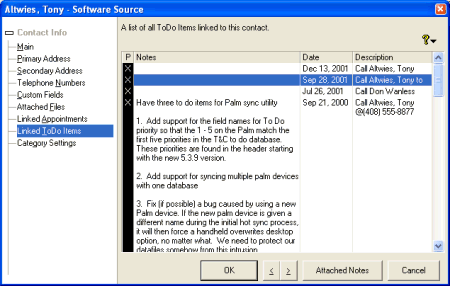
Notes displayed with Linked Appointments and To Do's
Now you can see the complete notes on any meeting on conversation via appointments or to do items that you linked back to a contact in your telephone book.
 Address
included on main screen display
Address
included on main screen display
The primary address is now visible for any selected contact, just above the telephone numbers. You can move the line between address and phone numbers up or down to adjust the screen space used for this information (but to go File, Save Startup Settings if you want us to make any size adjustments you make a permanent change).
 Single Column Telephone Book Toggle
A new button on the telephone book toolbar will allow you to merge the data from Last Name, First and Company Name into a single merged column. The list can still be sorted alphabetized either by Company Name or Last Name, depending on your preference.
Swap Fields
To exchange data from one field with the data in another, the Search and Report screen offers a feature called Swap Fields. For example, you can now exchange the data in phone number 5 with the data in phone number 7.
Before you search for records, set up column headings for the different fields you wish to swap data between. Once your search results are visible, you can go to Edit then Swap Fields. You will then have the option to pick the two columns you want to swap information between.
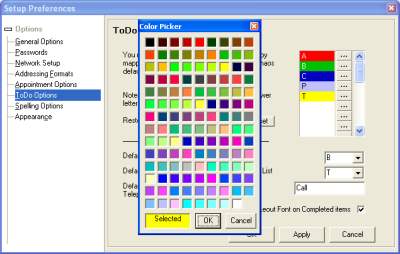
Customizable To Do Priority Colors
In the Preferences, you can now create your own customized priority values, in the order you want them to appear. In addition, you can now select your own choice for the color to match the priority level!
Modernized the look of the Data Entry screens
As you can see from the picture above, the data entry screens in 5.5.0 have been updated and redesigned to support the tree navigation style rather than the old tab style.
Revision History
This list covers only a highlighted sample of the new changes in Time & Chaos 5.6.5. We've done much more to improve and update T&C and we think this is the best version yet. If you want to see the complete list of all changes and updates in 5.6.5 and earlier, click here to view the Revision History.

Copyright © 2011 Chaos Software Group, Inc. - All Rights Reserved
[ Home ] [ Products and Downloads ] [ Purchase ] [ Mailing List ] [ Tech Support ] [ Contact Us ]