Sharing Chaos Data with an Android device
Chaos Intellect and Time & Chaos
offer excellent contact management with tasks and appointments, on Windows PCs.
You can easily expand your use of your Chaos Data files, however, to include using
your data with popular Android devices running this popular OS from Google, including phones from Samsung, Motorola, HTC and others.
1) Best Choice: add a ChaosHost.com account for your data!
Sync your data Over-The-Air to the built-in apps on your device!
Android devices feature built-in applications for Contacts and
Calendar data and have built-in support for online synchronization using a
technology called Exchange ActiveSync.
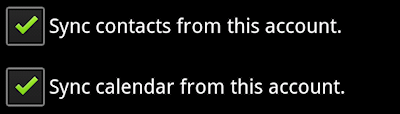 By having a ChaosHost account, you'll
be able to use a built-in way on your Android to sync with ChaosHost, just
like our desktop software does. Add a new account to your device the same way you
would add an new email account, but by using a special "Exchange" or "Corporate" account,
you'll see options for your device to sync Contacts and Calendars. This
data is sent from ChaosHost.com directly to your device through the Internet. You
won't have to use a wire or connect your device to a computer at all to get
this data!
By having a ChaosHost account, you'll
be able to use a built-in way on your Android to sync with ChaosHost, just
like our desktop software does. Add a new account to your device the same way you
would add an new email account, but by using a special "Exchange" or "Corporate" account,
you'll see options for your device to sync Contacts and Calendars. This
data is sent from ChaosHost.com directly to your device through the Internet. You
won't have to use a wire or connect your device to a computer at all to get
this data!
Your Android will also let you schedule how often to sync, so any changes you
make while mobile will get copied back to ChaosHost.com. When you return back to
your computer where Intellect is installed, our desktop software can sync with ChaosHost
to pull those changes down to our software on your PC, too!
(One caveat: over-the-air synchronization works best for databases of 2000 or less
contacts. There are configuration options, if needed, to only sync one particular
group of contacts instead of all contacts, but if you have a larger database and
can't live without it all getting transferred to your mobile device, you may
need to use one of the other alternate methods mentioned below!)
Bonus: Native Android apps from Chaos Software
We have also released our own native apps written specifically for Android which sync with ChaosHost to
get your data back and forth! These include calendar, contacts, tasks and billing. Take a look at
our Android products page for more details.
Use the live ChaosHost.com web app from your mobile Web Browser
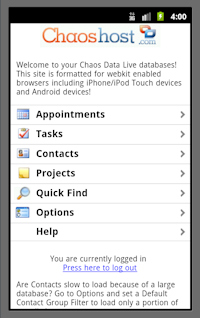 One other benefit of a ChaosHost
account is that in addition to hosting and synchronizing data, we also have a web
application that allows you to work with your data through a web browser when you
are away from your PC.
One other benefit of a ChaosHost
account is that in addition to hosting and synchronizing data, we also have a web
application that allows you to work with your data through a web browser when you
are away from your PC.
Either as a supplement to doing the Over-The-Air Sync or as a separate option, ChaosHost
offers a special mobile version of the Chaos Data Live web application that is designed
for use on mobile device web browsers.
When you login to ChaosHost's mobile edition, you can see your data, make changes
and additions, all at a form factor appropriate for handheld devices. When you get
back to your PC, you can use the Web Synchronization option in our PC software to
make sure your changes made online are transferred back down to your computer.
This web app is especially useful because it allows you to work with your Memos
or Projects data, which otherwise would not be available to your device, since most Androids
devices do not have built-in applications or Exchange synchronizing that supports
our Tasks or Projects data.
The special mobile version of ChaosHost formatted for mobile
can be found at https://www.chaoshost.com/m/.
How do I get a ChaosHost account and how does it work with my current software?
If you don't already use ChaosHost.com,
our sales department can set you up with a free, fully
functional, 30 day trial so you can see the sync process first hand before purchasing
a ChaosHost subscription. You won't need to hold it with a credit card either! If
it doesn't work for you they way you want, it will expire on its own without any
need to cancel. You'll only need to do something if you want to keep it!
Once you have an account, your data can
be synchronized with Chaos products using an option you will find is already built-in
to your desktop softare, on the File Menu, under Web Synchronization. Fill out your
user name and password and it is ready to go. You can sync your pc on demand or
sync automatically when you start and/or exit our program, your choice.
Keep in mind that unlike many "cloud" solutions, you are NOT giving up
your PC. Intellect and Time & Chaos will continue to keep a local copy of your
data with all the features you have gotten used to using. But, now you'll be able
to work in more places by using ChaosHost to keep your phone in sync or to use the
web site version from any borrowed computer!
Once your ChaosHost account is up and running, you can find the full step-by-step
details on adding the new ChaosHost account to your Android device in the ChaosHost help files.
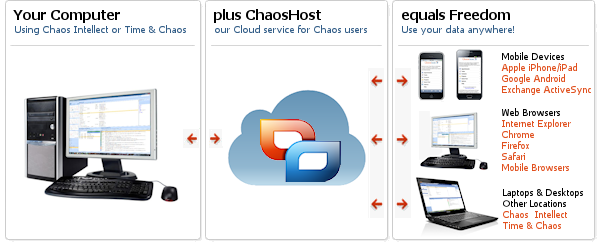
2) Desktop Sync: your computer is the server!
Our Desktop Sync program turns your computer
into an on-demand sync server. You need a bit more technical skill and you need
our Android apps on your device, but Desktop
Sync offers a single purchase program rather than a monthly or annual subscription
required for ChaosHost.com. If you don't need all the features
of ChaosHost.com, this one might be worth trying out!
3) Sync your phone and Chaos Software with Google
Of course, as a Google designed device, Android definitely supports
synchronizing with Google services for Google Calendar and Google Contacts.
We offer a sync tool called, appropriately enough, Google Sync. Google Sync
can upload and synchronize your data in our software to the Google Contacts
and Google Calendar web applications that Google hosts for their users. You
can find this in the download section of our website
Please keep in mind, however, that this option will not transfer Tasks or
Projects, so if these databases are vital to you, you will need
one of the other options above instead.