 |


|
USB Flash Drive + Chaos Intellect Business email software with CRM = Success Anywhere!
If you haven't heard of Chaos Intellect before now, you've missed out! We have years of experience making great contact management CRM software, as featured in our award winning contact manager called Time & Chaos. Chaos Intellect combines this powerful contact manager experience with a great email client that hits the sweet spot for users like you!
Get a fully
functional trial version with no questions asked!

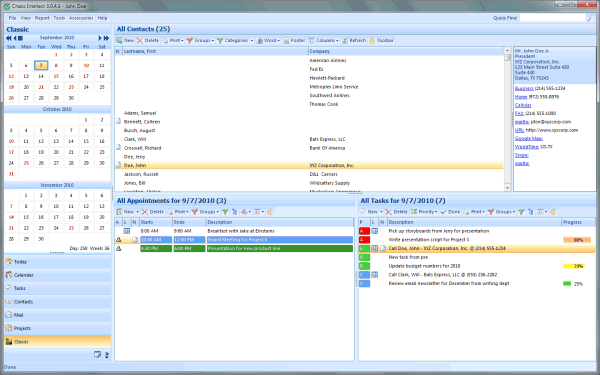
While we have many reasons to convince you that Chaos Intellect is right for you, one feature in particular that users love is the ability to install a second copy of our program on a keychain USB flash drive or memory stick to use it anywhere you can plug it in, without installing on the machine you borrow and without leaving data behind on their PC!
You'll have all your current email, contacts, calendar schedule and tasks everywhere you go. Best of all, you can easily keep the data (including email) in sync with the data on your main PC through our built-in synchronization features.
So how exactly do you accomplish this feat? Once Chaos Intellect is installed on your computer, you can find these instructions in the Intellect help file...
Installing Intellect on a Flash Drive
 One of our favorite features in Chaos Intellect
is the ability to install and run Intellect directly from a memory stick or flash drive.
One of our favorite features in Chaos Intellect
is the ability to install and run Intellect directly from a memory stick or flash drive.
A flash drive plugs into the USB port on any current Windows PC. It offers more space than the old A: floppy disks did, and fits easily on your keychain or in your pocket or briefcase.
With the popularity of this type of media, we can now create a fully functional licensed version installed directly to and run from a USB Flash Drive. This allows you to attach the device to a guest computer to access data without leaving any apparent tracks on the guest system. This even includes sending and receiving email messages!
The version of your data you work with on the Flash Drive can be synchronized intellegently with your computer so that any changes and updates you make to your data in one place can be shared with both.
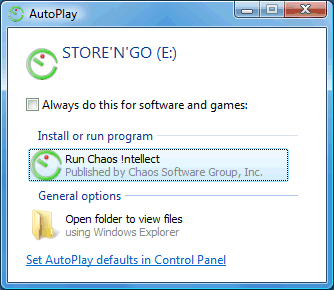
Once you have a flash drive ready to go with our software installed on it, you will be able to plug it into a computer where you will see a screen like the one on the right.
Installing Intellect to your USB Flash Drive is easy!
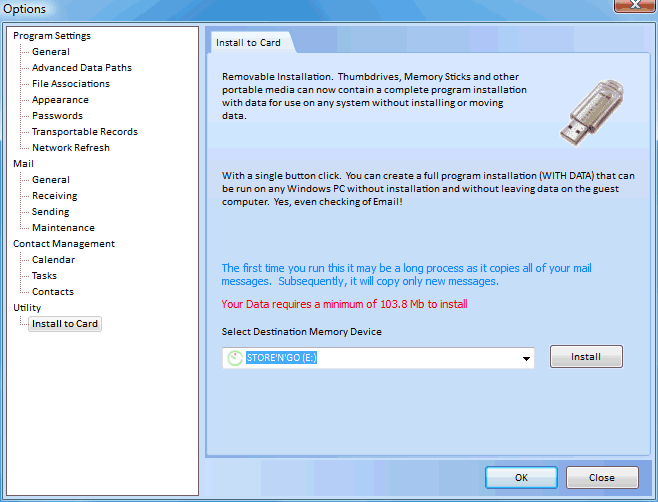
- From within Intellect, click on the "Tools" menu at the top, then select "Options". Within the options screen, click on the section "Install to card".
- Select the appropriate drive letter for your memory stick from the drop down menu "select destination memory device." Please note the amount of space required to fit all your data. Your email will eat up space quickly, so make sure your flash drive has room to grow!
- Select "Install" and watch a copy of Intellect install directly to your drive.
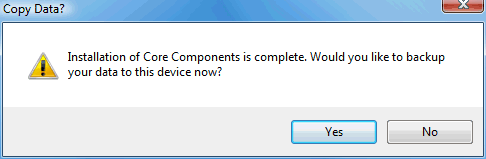
At the end of the installation process, you should have a few new folders on your flash drive. Your data has not been transferred yet, only the program and settings. You do get the following prompt, though, which takes you to the next step:
Getting your Data to and from the Flash Drive is easy too!
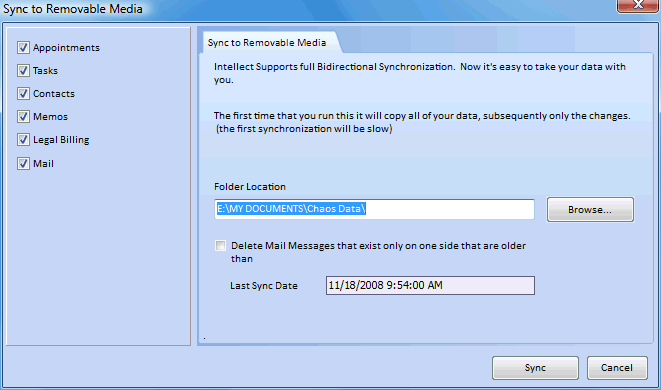
If you click "Yes" to the installation complete message, you will be taken to our "Sync with Removable Media" screen.
Please note that if you have done this directly from the "Install to card" screen, it will automatically fill in the data folder we created on your Flash Drive. The drive letter will depend on which letter your Flash Drive was assigned, but after the drive letter should be "My Documents\Chaos Data", which is similar to our default data location on your real PC.
- Select which data files you would like to sync - Contacts, Tasks, Appointments, Memos and/or Mail.
- Click "Sync" to transfer your data
 Now what?
With your data on your flash drive, you are ready to go! But if you use it, someday soon you'll want to come back to your "real" PC and bring your data with you that you have been updating.
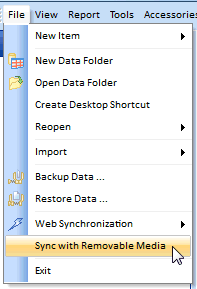
On the File menu is an option to Synchronize with Removable Media, which will take you back to the screen you did the initial sync from.
Ready to try Intellect out?
Want more information?
Sound good so far? We invite you to see it for yourself by
downloading a fully-functional trial version. You can try out this
memory stick feature and all of our others for 21 days before
purchase. Or perhaps you would like to read on for a complete
feature list, broken down by the normal types of users that buy
Intellect? Click here for the
Intellect homepage with highlights, features, and user review
testimonials...
Copyright © 2011 Chaos Software Group, Inc. - All Rights Reserved
[ Home ] [ Products and Downloads ] [ Purchase ] [ Mailing List ] [ Tech Support ] [ Contact Us ]