Chaos Software Blog
Use Phone Link from your desktop with Time & Chaos or Chaos Intellect
Posted · by Bill Tiede
We recently made version 10.6.1.0 of Chaos Intellect and 10.6.0.0 of Time & Chaos available for download. The biggest change in this update is the added ability to send Text Messages that start from clicking a link on the Contact and end with your smart phone delivering the message.
Time & Chaos and Chaos Intellect were always designed to be a hub of activity: you can see everything going on today and you can look at a specific contact and click links on the right to email them or go to their web site. Time & Chaos is old enough to be from a time where your computer had a modem you could connect to your landline to dial up for internet access or dial the phone for voice calls.
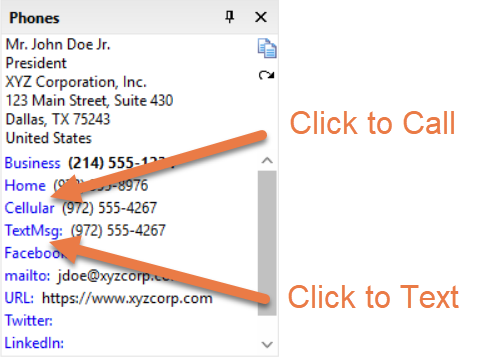
All of these years later making voice calls is easy again from Time & Chaos and Chaos Intellect in combination with Microsoft's Phone Link software, allowing you to click a label like Business or Home or Cellular in our program to voice connect using your smart phone.
Sending a text message to a client is easy, too! You just select a contact, click a TextMsg: link, write the message in Phone Link, then send to deliver with your smart phone.
Microsoft Phone Link
Microsoft's Phone Link program is what makes the connection possible from Time & Chaos and Chaos Intellect on your Windows PC to your smart phone.
The free Phone Link app for Windows is preinstalled on your computer if you have Windows 11, but can also be installed on Windows 10 computers from the Microsoft Store.
Microsoft has a page with more information about the Phone Link program and how to connect to your smart phone here:
https://www.microsoft.com/en-us/windows/sync-across-your-devices
Microsoft Phone Link works with both Android phones and iPhones!
Once Phone Link is connected to your smart phone, you will be able to bring up a contact in Chaos Intellect or Time & Chaos and use the phone number links on the right side of the screen to place calls or send text messages.
Text Messaging from Time & Chaos and Chaos Intellect
The new version 10.6.0.0 added has some new phone label choices you can use with your contact records. Specific to sending text messages is a new label, "TextMsg:".
How do you use this new label? One way would be to simply edit a contact and add the label on the left side (where you likely already have labels like Business, Home, and mailto:) just by selecting it from the drop down list. Then in the value field to the right, you would copy the cellular phone number for the contact and paste it into this field also. Save the record and this new TextMsg: link should appear on the right when you have this contact selected.
You might want to do some extra work though to 1) change the default labels for when you add new contacts, and 2) update existing contacts with this new phone label.
This is a link to the page in the Chaos help files on customizing the Phone Labels, with details about setting your default labels for new records and ways to retrofit existing contact records to match the new defaults:
https://www.chaossoftware.com/help%20files/intellect4/contacts-customize_phone_labels.html
Voice Calls from Time & Chaos and Chaos Intellect
The phone labels in Time & Chaos and Chaos Intellect such as Business, Home and Cellular are ready to click to start a voice call with your default dialing app in Windows.
To ensure these links go through Microsoft Phone Link to your smart phone, here is the configuration you should setup in the Chaos program:
- Click on Options
- Click on Telephony
- Select Use Internet Protocol
- Select Tel: as the protocol
- Enter your Country Code for your location. +1 is the Country Code for the United States.
With these settings, when you are viewing the card panel to the right of the contacts list with the information from the selected contact and click any voice link for Business or Home or Cellular, the Chaos program will pass the number to Windows which will then pass it to Phone Link for you to then dial without needing to copy and paste or type it in manually.
I've updated the information in the Chaos Help Files to include how to configure our software to take advantage of Microsoft Phone Link for dialing:
https://www.chaossoftware.com/help%20files/intellect4/telephony.html
Some other link questions answered
Q: What if I use Legal Billing? Can I still call phone numbers for clients or send them text messages?
A: Legal Billing can be used in combination with one of our contact programs. You'll need to download Time & Chaos, Chaos Intellect or Chaos Free, but if you tell these contact manager programs where you keep your billing data, it will use the same contacts data as you've already been using with Legal Billing. When you have the programs working together, you can dial using Time & Chaos or Chaos Intellect and any updates to make to the contact in one program will be seen by both.
Q: I can't get Microsoft Phone Link to work for me. Are there other options?
A: Time & Chaos and Chaos Intellect are using the default program for two protocols to make this work, tel: for voice calls and sms: for text messaging. Microsoft's Phone Link can be setup as the default program for these protocols and is a free program included in Windows 11. If you have a different program that supports tel: links, dial requests from our software would be sent by Windows to that program instead. Same if you have a different program that supports sms: links from Windows programs wanting to send a message via text.
Specific to voice calls, the telephony settings in our software let you select a different link type if you have an internet dialing program that uses a different protocol, like callto: instead of tel:
Q: Does this require the add-on ChaosHost service?
A: No, this dialing link can work whether or not you added ChaosHost service to Time & Chaos or Chaos Intellect. This connects directly from our program on your PC to Microsoft's Phone Link program, then to your phone.
Is this a free upgrade?
If you already own a standalone license for a prior version 10 of Chaos Intellect or Time & Chaos, these are free updates for you as part of your current product registration.
You can install the update either by using the Check for newer version option on the Help menu in your current version 10 or by downloading it from our web site directly.
If you own a prior generation of one of these programs and have not yet purchased a license for version 10, we do offer discounted pricing for our long-time users! The Purchase link at the top of
https://www.chaossoftware.com has an option for Upgrading User where you can enter your prior version's registration info to qualify for our special upgrade prices.
Need more help?
If you need additional help for something in Legal Billing, Chaos Intellect, Time & Chaos or ChaosHost.com, don't forget we have training videos (Chaos University), written documentation (Help Files) and a searchable knowledge base (Frequently Asked Questions), all at https://www.chaossoftware.com/support/. If you can't find the answers you need online with these resources, you can submit a question to me through the support web site as well.
Tags: Time & Chaos Chaos Intellect Phone Link Tips