Using Chaos Data on iPhone and iPad
Chaos Intellect and Time & Chaos
offer excellent contact management with tasks and appointments, on Windows PCs.
You can easily expand your use of your Chaos Data files, however, to include using
your data with your iPhone or iPad.
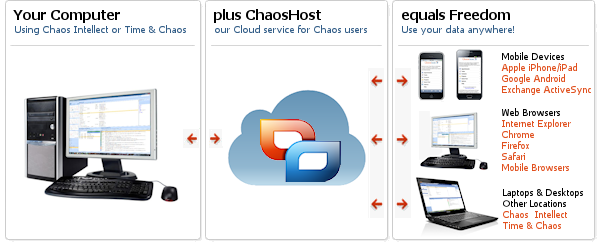
Add a ChaosHost.com account as a bridge for your data!
ChaosHost.com is a service that allows you to synchronize your Chaos Data files
with your iPhone or iPad. It works as a bridge between your PC and your mobile device,
allowing you to work with your data in more places than ever before. You can use
the ChaosHost.com service in two ways:
1) Native apps for iPhone and iPad
We have released a few native apps written specifically for iPhone which sync with
ChaosHost to get your data back and forth between your iPhone and your PC. They offer
some capabilities in areas where the normal apps from Apple or from others in the App
Store don't quite match what our Windows software can do. The current apps available
now are Chaos Calendar, Chaos Contacts, Chaos Tasks, and Chaos Billing. They
can be downloaded now from the App Store. Click here for details!
 |
 |
 |
 |
| Chaos Calendar |
Chaos Contacts |
Chaos Tasks |
Chaos Billing |
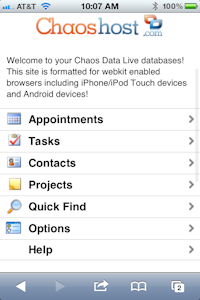 2) Use the live ChaosHost.com web app from your mobile Web Browser
The ChaosHost web site lets you manage your account or verify that the synchronization is working
well between syncs with your Windows computer running Legal Billing, Time & Chaos or Chaos Intellect
and your iPhone or iPad with our Chaos Billing, Chaos Calendar, Chaos Contacts or Chaos Tasks apps.
This web app also has a basic interface to work with your Projects data,
which otherwise would not be available to your device since we don't have an iOS/iPad
app for Projects data at this time.
Safari even lets you put specialized desktop icons right on your device's home page
so the web site can be launched just like any other app you downloaded from the App Store!
The special mobile version of ChaosHost formatted for iPhone and other mobile phones
can be found at https://www.chaoshost.com/m/
and you can use the special icons by bookmarking any section of our site and choosing
to add it to your main screen.
How do I get a ChaosHost account and how does it work with my current software?
If you don't already use ChaosHost.com,
our sales department can set you up with a free, fully
functional, 21 day trial so you can see the sync process first hand before purchasing
a ChaosHost subscription. You won't need to hold it with a credit card either! If
it doesn't work for you the way you want, it will expire on its own without any
need to cancel. You'll only need to do something if you want to keep it!
Once you have an account, your data can be synchronized with Chaos products using
an option you will find is already built-in to your desktop software, on the File
Menu, under Web Synchronization. Fill out your user name and password and it is
ready to go. You can sync your pc on demand or sync automatically when you start
and/or exit our program, your choice.
Keep in mind that unlike many "cloud" solutions, you are NOT replacing
your PC. Intellect and Time & Chaos will continue to keep a local copy of your
data with all the features you know and love. Now you'll also be able
to work in more places by using ChaosHost as the bridge to the apps installed elsewhere!
Once your ChaosHost account is up and running, you can find additional details on
using the new ChaosHost account with your Apple mobile device in the ChaosHost help files.